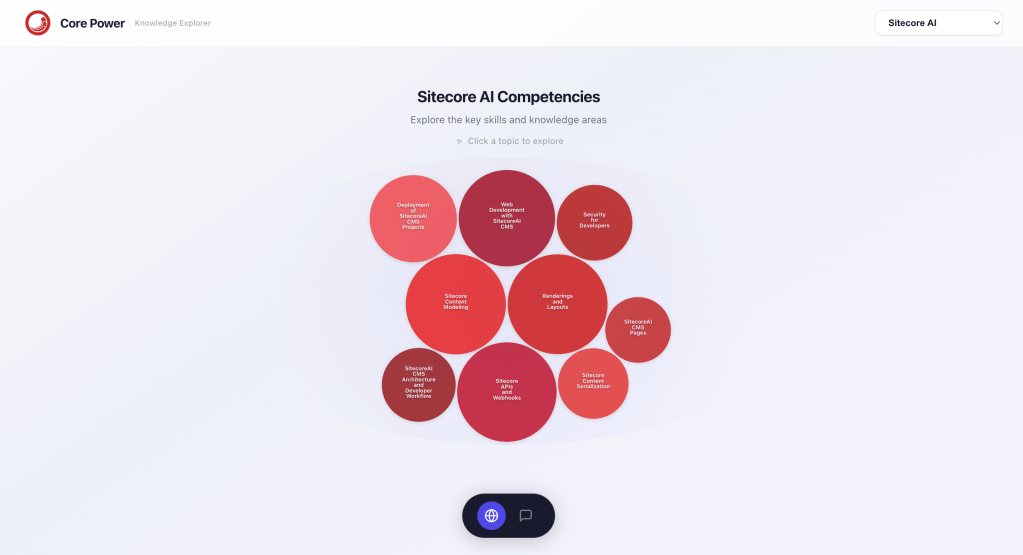
Welcome to Part 2 of my Sitecore Hackathon experience!
In this post, I’ll walk through what we actually built during our 24 hours of hacking—along with some of the technical decisions, tradeoffs, and lessons learned while building Core Power: Knowledge Explorer (website).
Understanding the Challenge
This year’s Sitecore Hackathon included three themes:
- Best Marketplace App for Sitecore AI – Build something publishable. Not just a demo.
- Applied AI Within the Sitecore Execution Pipeline – Demonstrate how AI can be embedded within Sitecore execution flows to improve quality, governance, personalization, or performance.
- Best Tool Supporting Sitecore Development (Not Built on Sitecore)
Initially, our team planned to build a Marketplace app focused on helping content authors adhere to brand and marketing guidelines. But after reviewing the ecosystem more closely, we realized something important: that problem was already being solved.
So… back to the drawing board.
Identifying a Real Problem
As we brainstormed, a recurring theme kept coming up: learning Sitecore is hard.
All three of us had similar experiences—we started as interns and had to learn Sitecore from the ground up. While the documentation is comprehensive, it can feel overwhelming, especially for newcomers trying to understand how everything fits together.
There’s a lot of information—but not always a clear path.
Even the eLearning platform, while helpful, doesn’t fully connect concepts into a cohesive mental model. One of the only places where structure does emerge is within certification study guides, where competencies are clearly defined and weighted.
That insight became our turning point.
The Idea: Knowledge Explorer
We decided to build a standalone learning platform—a structured entry point for developers navigating the Sitecore ecosystem, making learning feel less overwhelming and more intentional. The goal was simple:
Help developers understand what to learn, in what order, and why it matters.
Knowledge Explorer organizes content around competencies—logical groupings of topics inspired by certification study guides—and enhances them with AI-driven exploration tools.
Solution Overview
One of our core challenges was determining importance across a large and fragmented set of resources.
We developed a simple heuristic to assign weights to each competency:
- Certification exam weightings – how Sitecore weights this topic in their eLearning materials
- Community sentiment – how important or difficult the community perceives this topic to be
- Volume of available documentation – how much documentation exists for this topic on the Sitecore documentation site
This allowed us to move beyond a flat documentation structure and instead surface what actually matters most to developers.
AI Features We Prioritized
Given the 24-hour constraint, we focused on delivering a few key features well:
- Conversational study assistant
- AI-generated quizzes
- Visual competency mapping
Other ideas were scoped as future enhancements.
Technical Architecture
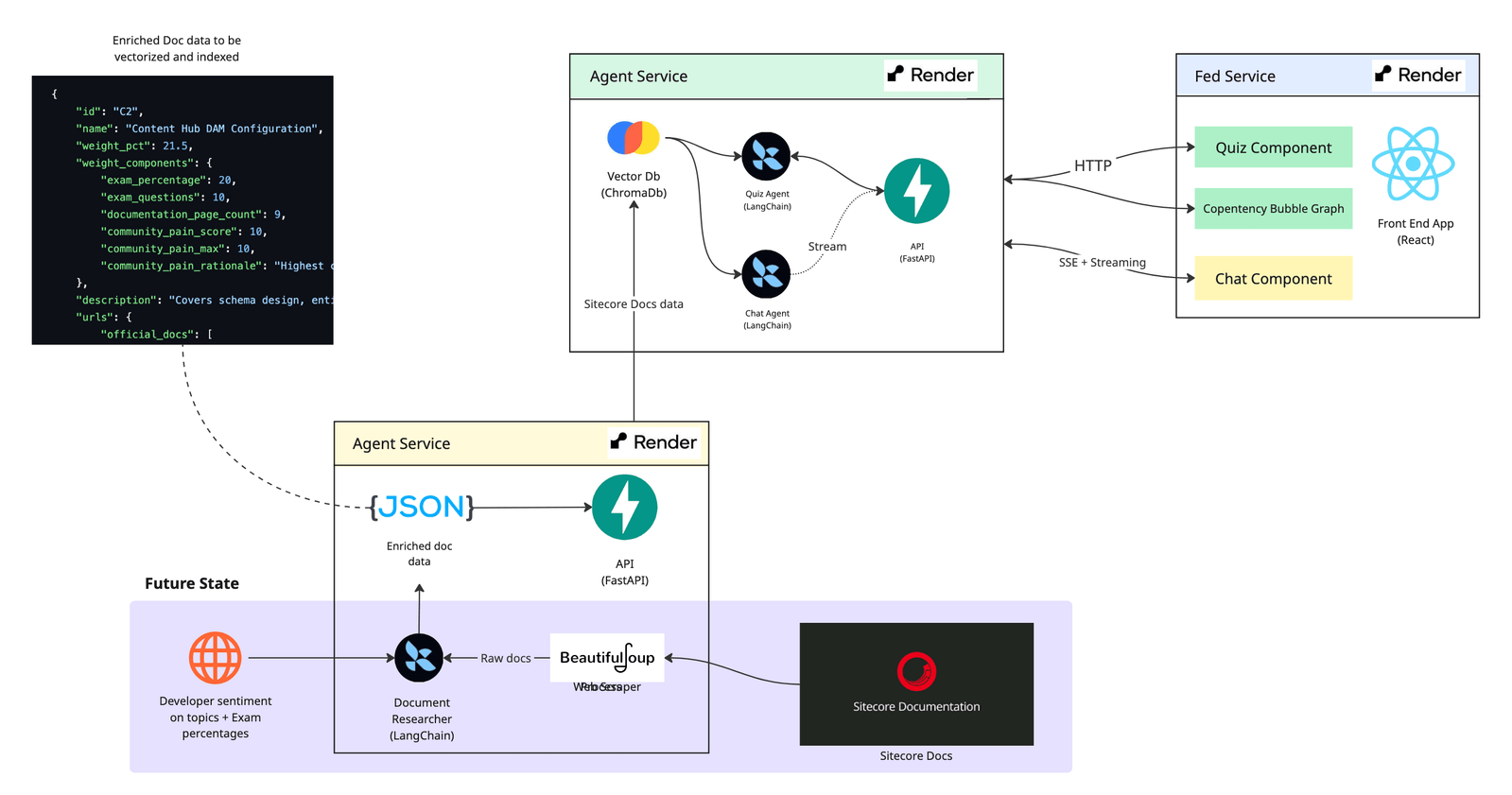
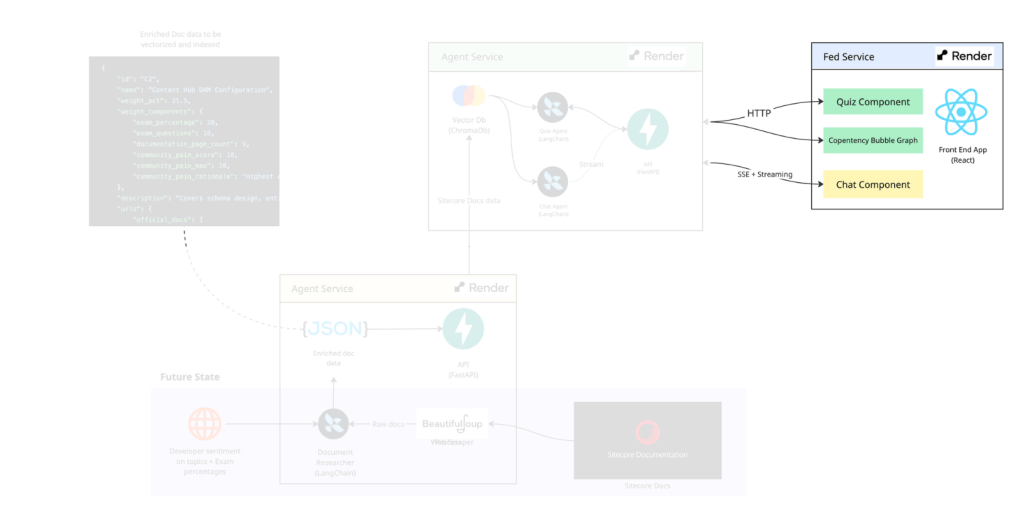
At a high level, Knowledge Explorer is a lightweight implementation of Retrieval-Augmented Generation (RAG).
The system consists of:
- A serializer service (data ingestion and normalization)
- An agent service (AI-powered interactions)
- A Next.js frontend SPA (Single-Page Application)
- A vector database (ChromaDB) for semantic retrieval
We hosted the application using Render and exposed API endpoints via FastAPI.
Serializer Service (Data Layer)
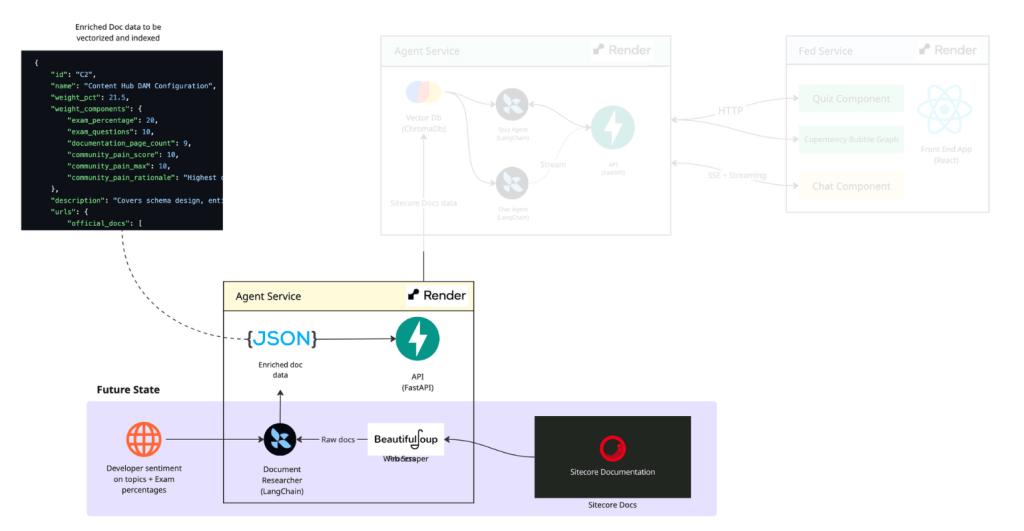
The serializer service is responsible for gathering and structuring data related to Sitecore topics. It:
- Scrapes and aggregates documentation and community content
- Normalizes it into a consistent JSON schema
- Exposes it via FastAPI endpoints
Due to time constraints, we mocked this dataset using Claude.
Future vision: we’d like to fully implement this layer using tools like BeautifulSoup and integrate frameworks like LangChain to enable deeper reasoning over real-time data sources.
Agent Service (AI Layer)
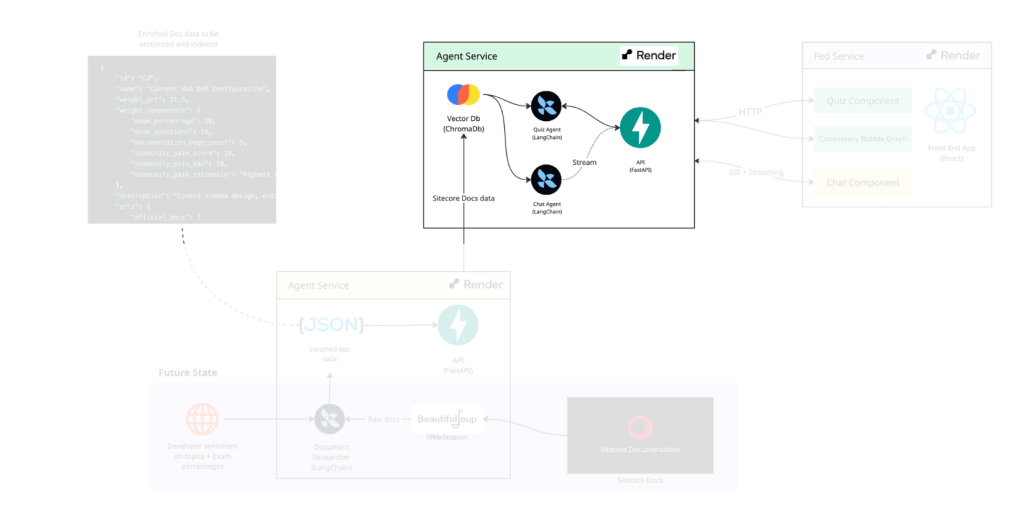
Once we had structured data, we embedded it into ChromaDB to enable semantic search.
Using LangChain, we built two primary agents:
- Conversational assistant – answers questions about Sitecore topics
- Quiz generator – dynamically creates study questions
Both agents leverage the ChromaDB vector database to generate context-aware responses.
We also made an intentional architectural decision to use Server-Sent Events (SSE) instead of WebSockets. Since our use case was one-way communication (AI → user), streaming provided a simpler and more efficient solution while still delivering a smooth chat experience.
Frontend Experience
On the frontend, we built a single-page application using Next.js. Our original idea was a tree-view of documentation relationships—but we quickly realized: that’s just recreating the problem.
Instead, we shifted to a competency-based visualization using D3.
- Topics are displayed as bubbles
- Size represents importance/weight
- Users can explore concepts visually and intuitively
This turned out to be one of the most impactful UX decisions we made. With the bubble view, the user can clearly perceive the importance of a specific competency or topic related to the others around it.
What’s Next
If we had more time, we would:
- Fully implement the web scraping pipeline
- Expand coverage beyond Sitecore AI and Content Hub
- Introduce multi-agent validation using tools like LangSmith to ensure accuracy of recommendations, documentation links, and generated insights
- Improve data accuracy and source attribution
We’re particularly excited about combining telemetry with our RAG pipeline to ensure that generated recommendations remain trustworthy and relevant.
Key Lessons Learned
1. Validate ideas early – we lost time pursuing an idea that already existed. Next time, we’ll validate ideas against the ecosystem before the hackathon starts.
2. AI accelerates—but doesn’t replace engineering judgment – AI helped us scaffold quickly and generate working code fast but without constraints code quality suffers and architecture becomes inconsistent. The faster AI helps us build, the more responsibility we have to build well.
3. Strong planning makes everything smoother – because we solidified our working processes at the beginning of the hackathon, defined roles early, and scoped intentionally, we were able to avoid chaos and last-minute scrambling. We used project management tools like Notion to stay organized and approached the hackathon the same way we would a project in our day-to-day work.
Final Thoughts
At the end of 24 hours, we had:
- A working, deployed application
- Core AI features fully implemented
- Clean and structured documentation
More importantly, we built something that we believe could genuinely help developers navigate the Sitecore ecosystem more effectively.
While this started as a hackathon project, our hope is that the idea could evolve into something useful for the broader developer community—especially for those just getting started.
This project reminded me that hackathons aren’t just about building fast—they’re about identifying real problems, experimenting with new approaches, and sharing what you learn. It’s not just about what we could build, but what would actually be useful.
And for me, that’s what made this experience so valuable.
If you’re curious, feel free to check out the project and documentation here: https://github.com/Sitecore-Hackathon/2026-Core-Power-Delta-Task-Force-Omega
 Musings by Mito
Leave a comment